

Leaving your house without your physical wallet or a heavy set of keys is no longer a futuristic concept. Over the past few years, the automotive industry has undergone a massive digital transformation, pushing traditional metal blades and plastic fobs closer to obsolescence. As we move through 2026, the convenience of walking up to your vehicle and driving away using only your smartphone has transitioned from a premium luxury gimmick into a standard mainstream expectation.
Establishing a reliable digital car key phone workflow means changing how you view vehicle security and accessibility. By ditching mechanical fobs, drivers unlock an entirely new ecosystem of wireless sharing, biometric identity protection, and hands-free operation. Whether you rely on an iOS ecosystem or use a flagship Android device, knowing how your smartphone communicates with your vehicle is the key to mastering modern automotive technology with Turboocruiser.
Why the Digital Car Key Phone System is Overtaking Traditional Fobs
For decades, physical key fobs operated on basic radio frequency signals that were prone to specific technical limitations and signal hacking. A modern vehicle digital entry ecosystem completely rewrites this security model by pairing your smartphone hardware directly with your car’s internal computer network. Modern vehicles are packing more than just performance under the hood — from massage seats to advanced driver assistance, explore the luxury car features to look for when shopping for your next upgrade.
Using your phone as car key hardware provides convenience that physical hardware simply cannot match. If you lose a physical key, replacing it at a local dealership can cost hundreds of dollars and take days of programming. Conversely, managing digital credentials takes seconds. You can lock, unlock, and ignite your engine using the encrypted secure enclave chip embedded directly inside your mobile device, making physical entry systems feel remarkably outdated.
The Technology: NFC vs. UWB Digital Key Ecosystems
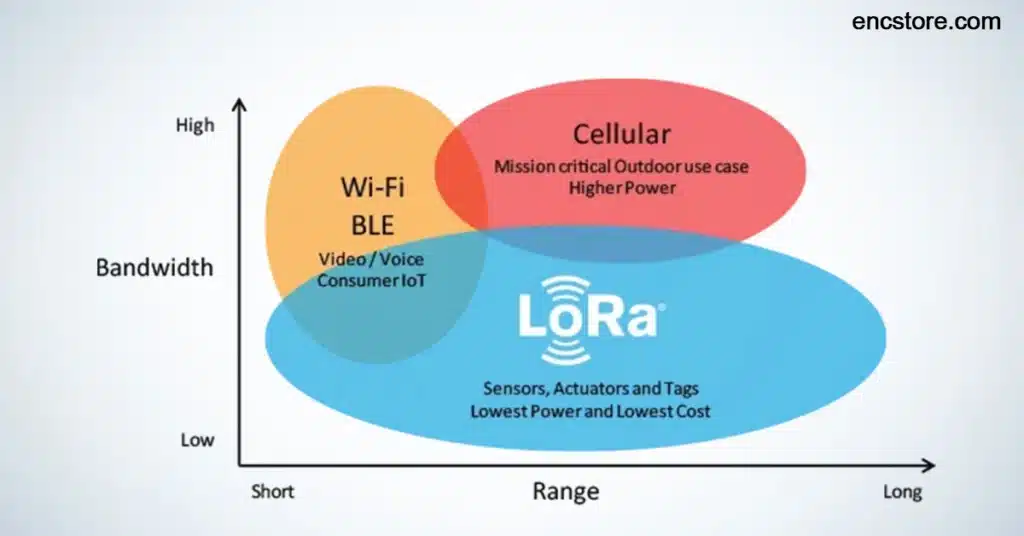
Not all digital entry systems are built the same way. The market is currently split between two primary wireless communication protocols, and understanding the difference changes how you interact with your vehicle.
Near Field Communication (NFC) Basics
NFC requires you to physically tap or hold your smartphone within an inch of the driver-side door handle to trigger an unlock action. While highly secure, it lacks the effortless convenience of proximity-based entry.
Ultra Wideband (UWB) Spatial Awareness
A true uwb digital key offers a vastly superior passive entry experience. UWB technology allows your car to measure the exact distance and precise position of your authorized device down to a few centimeters. This spatial awareness means your car can unlock the doors as you approach the vehicle and automatically activate internal ambient lights without you ever needing to pull your phone out of your pocket or backpack.
How to Set Up and Use a Car Key on iPhone
Apple has been a major driving force behind the adoption of modern vehicle access tokens. Setting up an official apple car key allows you to store your vehicle credentials directly inside your native Apple Wallet application alongside your credit cards and transit passes.
Activating the Connection
To install a car key on iphone, you must first log into your manufacturer companion application using the account tied to your vehicle registration. Follow the onboarding instructions to sync your iPhone with the wireless charging pad or door handle sensor, which automatically prompts Apple Wallet to generate an encrypted digital pass.
Sharing Virtual Access Remotely
Once your profile is active, you can share access with family members instantly via Apple iMessage. The system allows you to set specific access parameters, such as restricting engine starting privileges for teenage drivers or limiting access to a specific timeframe for valet services.
The Complete Digital Key Cars List for 2026
The automotive industry has witnessed massive growth in system compatibility over the past year. This comprehensive digital key cars list highlights the major manufacturers that currently provide true native mobile wallet key integration for their recent production lineups.
| Automotive Manufacturer | Core Protocol Used | Native Wallet Compatibility | Proximity Entry Support |
| BMW | NFC and UWB | Apple Wallet / Google Wallet / Samsung | Full Passive Entry |
| Hyundai & Kia | NFC and UWB | Apple Wallet / Google Wallet / Samsung | Model Dependent |
| Mercedes-Benz | NFC and UWB | Apple Wallet / Samsung Wallet | Full Passive Entry |
| Genesis | NFC and UWB | Apple Wallet / Google Wallet / Samsung | Full Passive Entry |
| Audi | NFC and UWB | Apple Wallet / Google Wallet | Model Dependent |
| Lexus & Toyota | NFC and UWB | Apple Wallet / Google Wallet | Extended Support |
| Rivian | NFC and UWB | Apple Wallet | Full Passive Entry |
Creative Ways to Use Mobile Vehicle Credentials
Do not think of your wireless connection as a mere replacement for a standard door lock. Embracing a digital ecosystem unlocks unique logistical possibilities that streamline your daily driving habits.
1. Multi-Car Household Management
If your family owns multiple modern vehicles from different brands, you can manage access tokens for all of them inside a single mobile application. This eliminates the messy clutter of carrying a bulky ring of traditional plastic fobs in your pocket or purse.
2. Streamlined Remote Valet Drops
Instead of handing an expensive physical fob to a parking attendant, you can text a temporary digital token directly to their device. You can program the pass to expire automatically after two hours, ensuring your vehicle remains fully protected after you leave the venue.
3. Contactless Fleet Coordination
For small business owners managing delivery vans or corporate fleets, digital access tokens allow managers to assign specific vehicles to specific drivers remotely. Employees can walk out to the lot, locate their assigned van, and unlock it instantly using their corporate phone profile without needing to visit an office key locker.
Tips for Ensuring Flawless Mobile Car Access
Relying entirely on a smartphone for vehicle access can feel intimidating at first. Follow these essential operational tips to make sure your wireless driving experience remains seamless and completely stress-free.
Enable Express Mode: Make sure your mobile wallet is set to express mode. This configuration allows you to unlock your vehicle and start the engine instantly without needing to unlock your device screen with Face ID or passcodes first.
Understand Power Reserve Safety: Modern smartphones feature a built-in power reserve system. If your mobile device battery drains completely and the phone shuts down, the secure tracking chip continues to function for up to five hours, allowing you to unlock your car and drive home safely even with a dead phone.
Keep Bluetooth and Location Active: Proximity-based UWB tracking requires your mobile wireless systems to stay active. If you frequently toggle your wireless settings off to save battery life, your vehicle will fail to recognize your phone as you approach the door handles.
Security Protocols: Preventing Relay Exploits
The most common concern regarding phone-based vehicle entry systems is digital hacking or wireless signal theft. Traditional key fobs are historically vulnerable to relay attacks, where a thief uses an amplifier antenna to capture the fob signal from inside your home and replicate it near your vehicle parked on the driveway.
A modern uwb digital key renders relay exploits completely impossible. Because ultra-wideband relies on real-time time-of-flight calculations to measure the exact nanosecond a signal takes to travel between the phone and the car, any attempt to amplify or relay the signal artificially changes the travel time. The vehicle computer immediately recognizes this delay as a security mismatch and keeps the doors locked.
Conclusion
Transitioning to a digital car key phone setup is the ultimate way to modernize your daily commute and streamline your vehicle access. By leaving physical fobs behind and embracing cutting-edge spatial technology, you protect your vehicle with elite-level encryption while enjoying the luxury of true hands-free proximity entry.
When you evaluate your next vehicle purchase or check your current vehicle compatibility, remember that these systems succeed because they unite advanced digital security with unmatched user convenience. Rather than dealing with lost hardware or expensive dealership reprogramming fees, you can use an apple car key or Android token to share access, restrict driving parameters, and secure your vehicle effortlessly. Skip the traditional key rings on your next automotive adventure and build a completely connected driving experience instead. For comprehensive vehicle compatibility updates, hardware reviews, and future automotive tech guides, explore our full collection of owner resources at Turboocruiser.
Frequently Asked Questions
What happens to a digital car key phone if the device battery dies?
If your mobile device battery runs out completely, you do not have to worry about being stranded. Flagship smartphones include an automated power reserve feature that maintains a tiny charge dedicated to your secure wallet chip, allowing you to tap and unlock your car for up to five hours after the screen goes black.
Can you use an apple car key on multiple consumer devices simultaneously?
Yes. Once your vehicle profile is generated inside your main account, you can pair your active credentials across both your iPhone and an Apple Watch. This allows you to lock, unlock, and ignite your vehicle engine seamlessly even if you decide to leave your main phone at home during a workout run.
Are phone as car key systems vulnerable to traditional wireless signal hacking?
No. While older radio fobs were vulnerable to signal grabbers and relay boxes, modern systems utilizing a uwb digital key require precise time of flight calculations. If a hacker attempts to replicate or intercept the signal, the car detects the physical distance delay instantly and locks down the ignition system.
How do I check if my vehicle is on the digital key cars list?
You can confirm compatibility by checking the official companion application provided by your vehicle manufacturer or reviewing updated documentation inside your Apple Wallet or Google Wallet settings. Compatibility depends heavily on the specific model year, internal trim package, and hardware sensors installed in your vehicle doors.
Can I revoke shared access tokens if a phone is lost or stolen?
Yes. If a family member loses their phone, the vehicle owner can instantly log into their main manufacturer application or iCloud account and delete that specific digital token remotely, ensuring the lost device can no longer be used to gain entry to the car.